

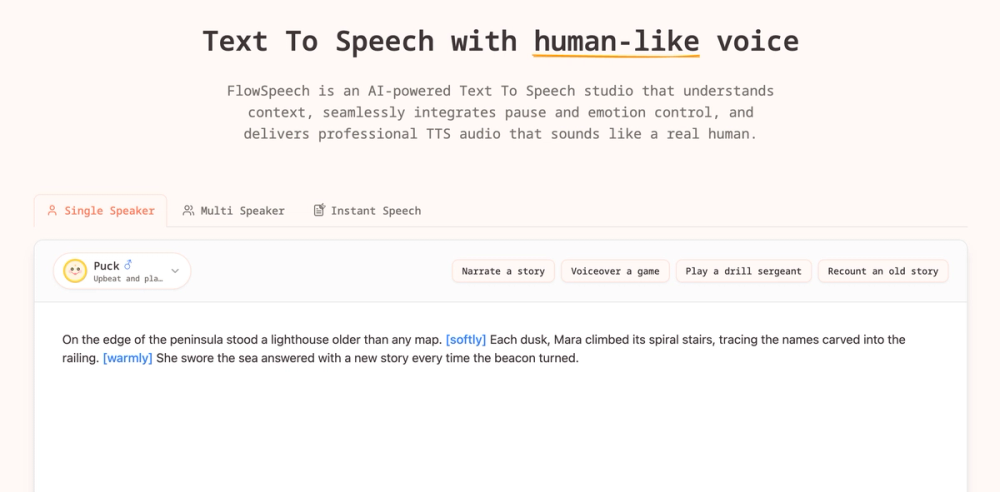
FlowSpeech – Context‑Aware Text‑to‑Speech Studio
FlowSpeech is a web‑based AI text‑to‑speech (TTS) platform that generates human‑like audio from written text. It goes beyond basic TTS by understanding the context of the script, allowing precise control over emotion, pauses, accents, and speaker assignment.
Key Features
- Context‑aware emotion delivery – The engine analyses sentiment and automatically adds appropriate emotional tone (joy, sorrow, excitement, etc.).
- Custom tags – Use simple bracket syntax (
[whisper],[shout],[strong British accent]) to force specific vocal styles. - Precise pause control – Insert pause tags like
[⌛1.0s]to fine‑tune timing without external DAW editing. - Single, Multi‑Speaker & Instant modes – Choose solo narration, dialogue with automatic speaker‑voice matching, or rapid one‑click generation.
- Auto‑markup – Upload a script and let the AI automatically insert emotion tags for single‑speaker projects.
- 30+ voices across 4 styles – News‑anchor, marketing, storytelling, and character voices.
- 70+ language support – Reach global audiences with multilingual TTS.
- Large‑scale rendering – Up to 200 k characters per render, handling long‑form content such as books.
- File ingestion – Directly import PDF, DOC/DOCX, PPT/PPTX, TXT, RTF, EPUB, and image files.
Typical Use Cases
- Audiobooks & e‑learning – Convert novels, textbooks, or course material into immersive audio with natural pacing.
- Video voice‑overs – Add professional narration to marketing videos, tutorials, or explainer clips.
- Podcasts & interviews – Quickly produce multi‑speaker conversations without hiring multiple voice actors.
- Game dialogue – Generate character lines with distinct accents and emotions.
- Corporate communications – Create announcements, training modules, or internal briefings.
Frequently Asked Questions
- What is FlowSpeech? A context‑aware TTS platform that produces lifelike speech with emotion, pause, and multi‑speaker capabilities.
- How does it differ from other TTS services? It understands script context, offers custom tags for emotions/accents, and provides auto‑markup for single‑speaker scripts.
- Can I use the generated audio commercially? Yes, the license permits commercial use of the audio you create.
- Is there a free tier? A limited free tier is available; paid plans unlock higher character limits and premium voices.
- How are my data and uploads protected? All files are processed securely and are not stored longer than necessary for rendering.
- Do you support custom voice creation? Custom voice training is planned for future releases.
Getting Started
- Select a generation mode – Single Speaker, Multi‑Speaker, or Instant.
- Enter or upload your text – Supports many document formats.
- Add emotion or pause tags – Type
[to open the command palette. - Choose a voice – Browse the 30+ voices and select the style that fits your project.
- Generate and download – Export the audio file for immediate use.
FlowSpeech empowers creators, marketers, educators, and developers to produce high‑quality, human‑grade audio quickly and at scale.


